Creating your Listing: Video

Video has become one of the most effective ways to show buyers what makes a home special. While photos capture important details, video provides movement, flow and atmosphere. It helps buyers get a stronger sense of space, layout and lifestyle before they even book a viewing. Adding video to your listing can increase engagement, attract more serious buyers and help your property stand out in a busy online marketplace.
Why Should You Add Video To Your Property Listing?
Video plays a big role in how people browse online, and it makes property listings far more engaging. When buyers can watch a video of your home, they get a more immersive sense of the space. A strong video can:
- Show how your rooms connect and flow
- Highlight features not obvious in photos
- Demonstrate space, light and movement
- Make your listing feel more professional
- Give buyers confidence and encourage viewing requests
Where Do You Upload or Add Video In Your Emoov Dashboard?
When you are adding or editing your property, you will see the Virtual Tour section within the Add-Ons page. This is where you can choose whether to include a video on your listing.
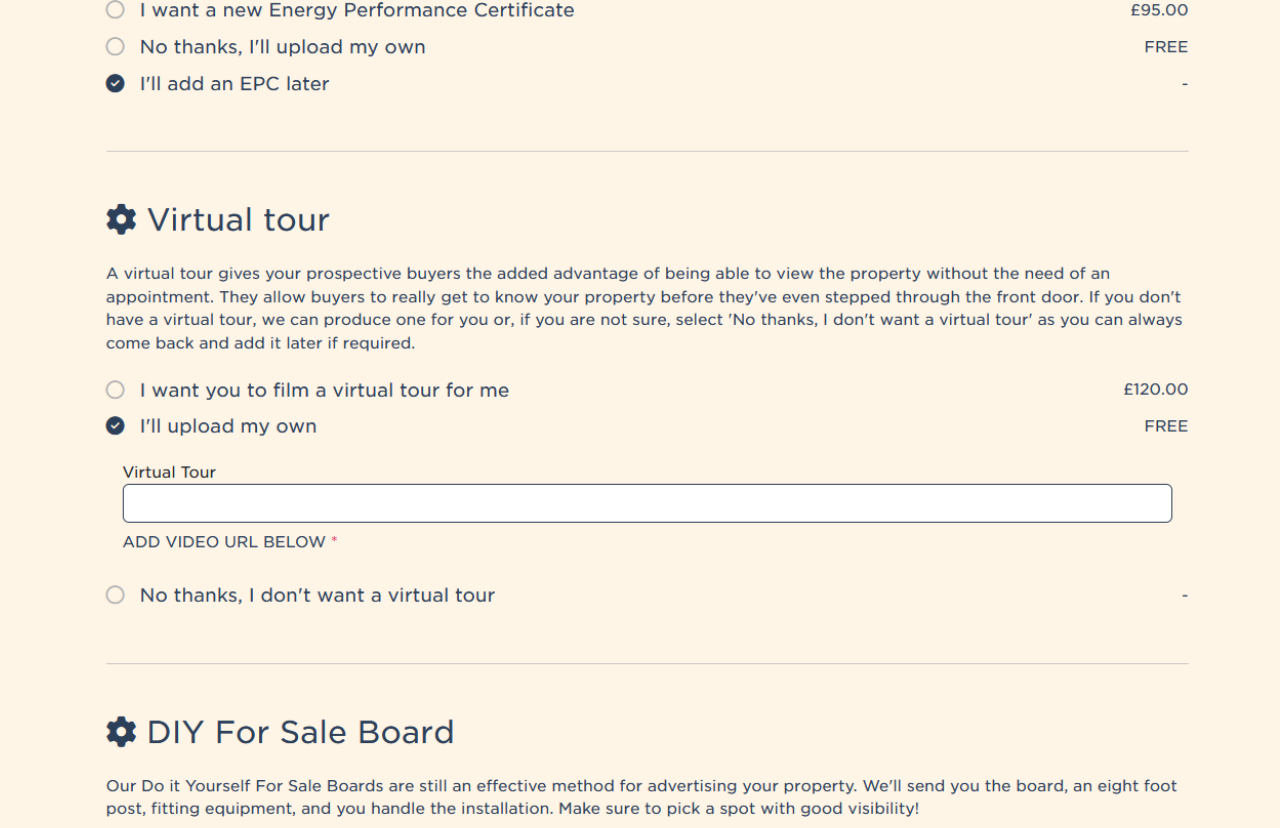
You have two ways to add one:
Pay for a virtual tour
Select this option if you would like Emoov to arrange a professionally filmed video walkthrough of your home. This is a paid add-on and the finished video will be added directly to your listing.
Upload your own video
If you already have a video of your property, you can paste the video URL into the box provided. This could be a simple phone walkthrough, a pre-recorded tour or any clear video that shows your home. You can update or replace the link whenever needed.
Where should you upload your video?
To add your own video, you will need to upload it to a hosting platform first and then paste the URL into this section. The most commonly used platforms are YouTube and Vimeo as they allow easy sharing. Simply upload your video to one of these services, copy the link and paste it into the Virtual Tour section.
If you prefer not to add a video at this stage, you can select 'No thanks, I don't want a virtual tour' and come back to it later.
Including a video, even a basic walkthrough, helps buyers understand the layout and flow of your home, often leading to more confident and informed enquiries.
Tips For Filming Your Own Video
- Tidy and prepare the home as you would for photography
- Open curtains and allow natural light wherever possible
- Hold the camera steady and move slowly
- Film in landscape orientation for property portals
- Start at the entrance and follow a natural flow through the home
- Avoid quick movements or sudden panning
The goal is to give buyers a calm, clear sense of your property.
How Long Should Your Property Video Be?
Most effective property videos are between 30 seconds and 2 minutes. Long enough to show the key spaces, short enough to keep buyers engaged.
In Summary
Adding video to your property listing is one of the simplest ways to make your home stand out online. Whether you film your own walkthrough, upload a virtual tour or choose a professional upgrade, video helps buyers understand the space and feel more connected to your home. When combined with strong photography, clear descriptions and accurate details, video becomes a powerful tool in attracting serious buyers and increasing viewing activity.
Useful Links
Get a free online property valuation
.png)
A Step-by-Step Video Guide: Uploading a Property
23.12.2025This guide explains how to upload your property listing on Emoov, with a step-by-step video and expert tips on photography, presentation, floorplans, descriptions and video tours to help you get your home live quickly.
.png)
Welcome to Your All-New Emoov Dashboard!
03.07.2025We’ve been busy behind the scenes designing a brand-new dashboard to make navigating Emoov smoother, faster, and more enjoyable. With a cleaner layout and powerful new features, managing your property journey has never been easier.

Your Dashboard: Rightmove Subscription
16.02.2024Rightmove is one of the UK’s most popular property portals, and upgrading your Emoov listing with a Rightmove subscription can help your property reach more potential buyers.

Your Dashboard: Offers
16.02.2024Receiving an offer is one of the most important moments in your sale. Your Emoov dashboard gives you full control, letting you review, negotiate and respond to offers clearly and confidently, without pressure.

Your Dashboard: Viewings
16.02.2024
Your Dashboard: Your messages
16.02.2024









The legal stuff
Emoov is a trading name of Griffin Residential Limited. Griffin Residential Limited is a company registered in England and Wales. Company Reg No. 09362284.