Creating your Listing: Description

Your property description is one of the most important parts of your listing. It supports your photos, explains the layout, highlights key selling points and helps buyers understand how your home could work for them. A clear and well-structured description encourages more clicks, more enquiries and more meaningful viewings.
Where Do You Add or Edit Your Property Description?
When you add or edit your property in your Emoov dashboard, you’ll see a section called Describe Your Property within the main Property Details page. This is where you write the opening text that appears at the top of your online listing.
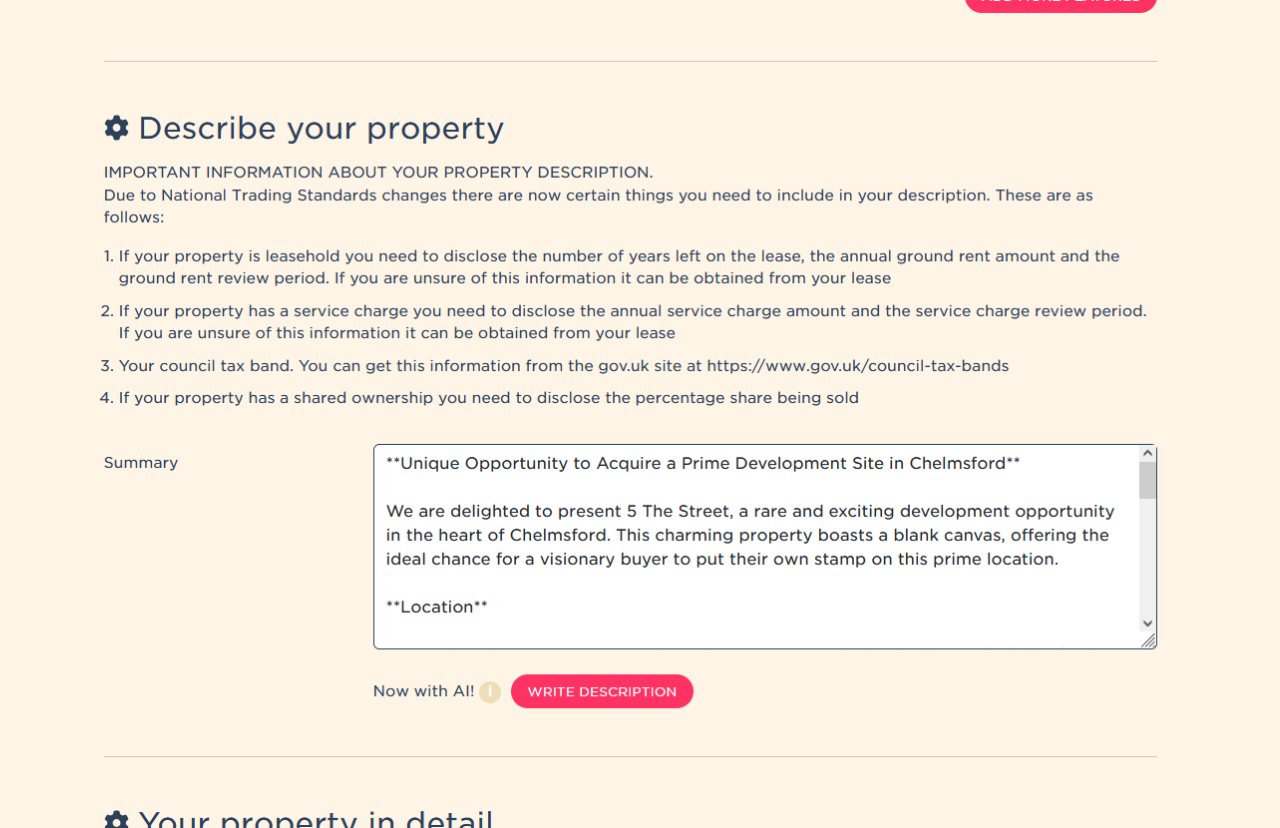
At the top of this section, you'll see important guidance based on the latest National Trading Standards requirements. If your property is leasehold, has a service charge, includes shared ownership or if you need to disclose your council tax band, you’ll be prompted to include this information in your description. Adding these details keeps your advert compliant and gives buyers the information they expect.
Below this guidance is a large text box labelled Summary. This is where you write (or update) the main description for your home. You can edit this anytime - whether you're creating your listing for the first time or improving it later. This text appears directly on your live property advert.
AI-Powered Description Tool
Within the same section, you’ll see a button called Write Description. This is an AI-powered tool that generates a draft description to help you get started. Simply click it to produce a suggested summary, then review and edit it so it reflects your home accurately. The AI draft gives you inspiration and structure, but you remain fully in control of the final wording.
Everything you enter in this section is exactly what buyers will see once your listing goes live, and you can adjust the description any time as your listing develops or new details become relevant.
Why Is a Good Property Description Important?
Photos attract attention, but the description often determines whether a buyer takes the next step. A strong description:
- Helps buyers visualise how the home works
- Highlights features they may not notice in photos
- Reduces unsuitable enquiries
- Builds trust by providing clear, accurate information
- Encourages serious buyers to book a viewing
A well-presented description improves engagement from the moment your listing appears on portals like Rightmove and Zoopla.
What Should You Include in Your Property Description?
Buyers want clarity, structure and useful information. Your description should be easy to read and focused on what matters most.
Start With a Clear Opening Summary
This should provide a quick snapshot of your home’s biggest selling points. For example: “A bright and well-presented three-bedroom home set close to local schools, shops and transport links.”
Keep this short, factual and engaging.
Highlight the Key Selling Features
Call out the features that genuinely add value:
- Modern or renovated rooms
- Outdoor space
- Parking or garage
- Period features
- Energy efficiency upgrades
- Extensions or open-plan layouts
Focus on what sets your home apart.
Explain the Layout Clearly
Buyers appreciate a simple overview of how the property flows. For example: “The ground floor includes a living room, kitchen diner and WC, with three bedrooms and a family bathroom upstairs.”
This helps buyers picture the space before booking a viewing.
Include Practical Information
Useful details help buyers make quick decisions. Consider mentioning:
- Local transport connections
- Schools and amenities
- Parking arrangements
- Garden size or orientation
- Lease details (if leasehold)
- Recent upgrades or improvements
Accurate information also supports compliance with trading standards.
How Long Should Your Description Be?
Aim for around 150–300 words. Long enough to be informative, short enough to hold interest. Break text into smaller paragraphs to make scanning easier - online readers rarely read large blocks of text.
Can You Update Your Description Later?
Yes - you can edit your text at any time from your Emoov dashboard. Updating is useful when:
- You change photos or floorplans
- New selling points become available
- You want to refine the wording for better engagement
- You receive feedback or questions from buyers
Refreshing your description helps maintain interest and ensures accuracy throughout your selling journey.
What Should You Include in the Room Details Section?
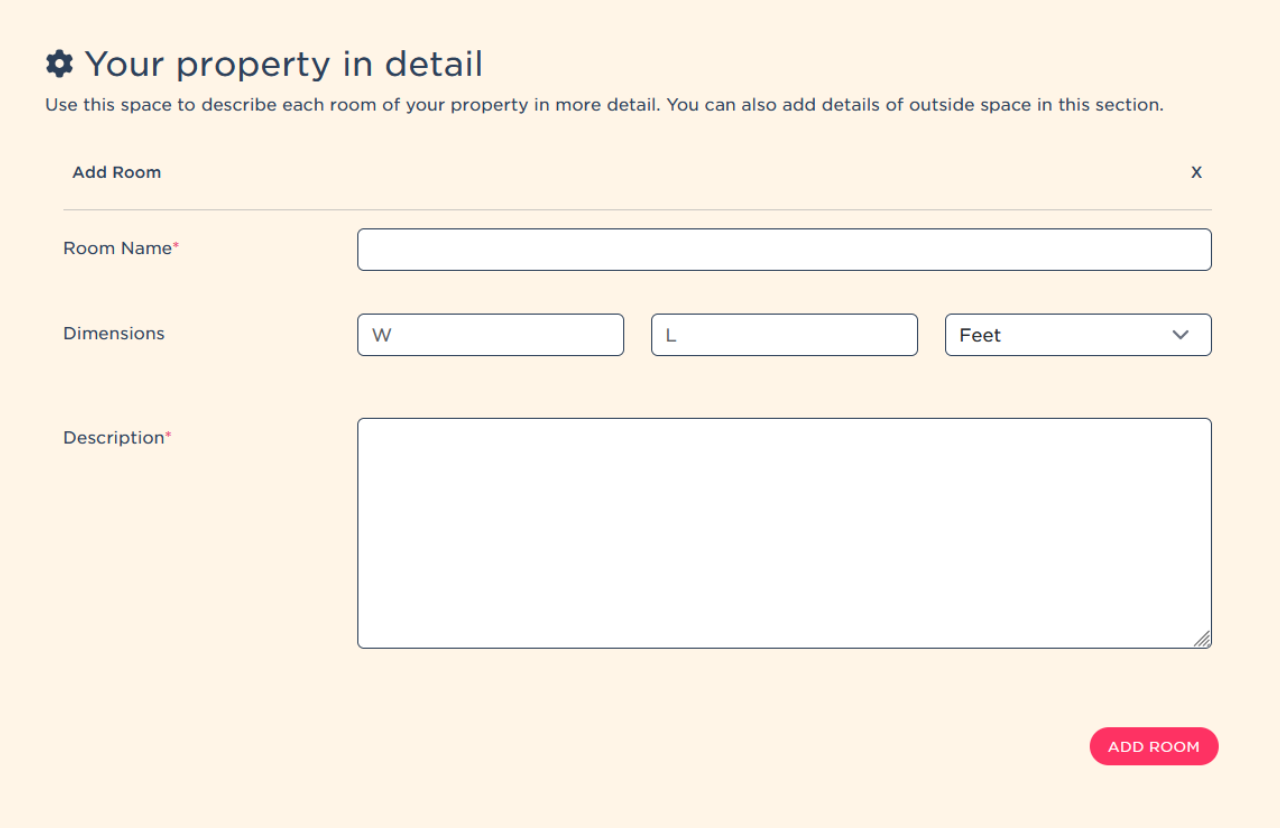
The next section you will see on the Property Details page is Your Property in Detail. This is where you can add each room individually, including the room name, measurements and a short description. It’s a great place to highlight key features such as storage, natural light or recent updates, and you can also include details of any outdoor areas like gardens or balconies. Everything you enter here feeds directly into your listing, giving buyers a clearer, room-by-room understanding of your home.
Summary
In summary, your property description plays a crucial role in how buyers perceive your home online. The first 300 characters create your preview text and must capture attention quickly, while the main description should give buyers a clear sense of the layout, key features and lifestyle benefits. Using the Describe Your Property section in your dashboard, you can update your wording at any time, stay compliant with National Trading Standards and take advantage of Emoov’s new AI-powered description tool to help you get started. A clear, accurate and engaging description makes your listing stronger, more searchable and more appealing to serious buyers.
Useful Links
Get a free online property valuation
.png)
A Step-by-Step Video Guide: Uploading a Property
23.12.2025This guide explains how to upload your property listing on Emoov, with a step-by-step video and expert tips on photography, presentation, floorplans, descriptions and video tours to help you get your home live quickly.
.png)
Welcome to Your All-New Emoov Dashboard!
03.07.2025We’ve been busy behind the scenes designing a brand-new dashboard to make navigating Emoov smoother, faster, and more enjoyable. With a cleaner layout and powerful new features, managing your property journey has never been easier.

Your Dashboard: Rightmove Subscription
16.02.2024Rightmove is one of the UK’s most popular property portals, and upgrading your Emoov listing with a Rightmove subscription can help your property reach more potential buyers.

Your Dashboard: Offers
16.02.2024Receiving an offer is one of the most important moments in your sale. Your Emoov dashboard gives you full control, letting you review, negotiate and respond to offers clearly and confidently, without pressure.

Your Dashboard: Viewings
16.02.2024
Your Dashboard: Your messages
16.02.2024









The legal stuff
Emoov is a trading name of Griffin Residential Limited. Griffin Residential Limited is a company registered in England and Wales. Company Reg No. 09362284.