Your Listing Photography: How to Make Your Home Stand Out Online

Great photos can make or break your property listing. With Emoov, you can upload up to 10 photos for free, or upgrade to unlimited photos for just £25, helping you showcase every angle of your home. This guide answers the most common questions sellers ask about property photography, with quick tips, links to helpful Emoov resources, and step-by-step instructions on how to upload your photos.
Why Do Great Photos Matter When Selling Your Home?
Buyers decide within seconds whether to click into a listing, and your photos are the very first thing they see. High-quality images create a powerful first impression, attract more online views, and draw in serious buyers. Good photography helps people understand the layout, feel the space, and imagine themselves living there - before they’ve even booked a viewing.
How Many Photos Can You Upload on Emoov?
Emoov gives you plenty of flexibility when it comes to showcasing your home. Every seller can upload up to 10 photos for free, which is usually enough to cover the main rooms, exterior shots, and key features of most properties.
If your home has more space to show off—such as multiple reception rooms, larger gardens, outbuildings, feature areas, or unique architectural details—you may want to include more images to help buyers get the full picture. In that case, you can upgrade to unlimited photos for just £25, giving you complete freedom to highlight every angle of your property.
Uploading is simple and can be done at any time during your listing process. Just head to your dashboard to start adding your images: Emoov Dashboard
What Makes a Good Property Photo?
Orientation
The property portals prefer photos in landscape format. If you only have portrait photos, that's okay, but be aware they may display either cropped or with white borders either side.
Camera Choice and Set Up
To get the best photos possible, we recommend using a DSLR camera over a smartphone, as your pictures will look more professional. If using a camera, always use a wide-angle lens where possible, as it means you'll be able to fit more of the room in the frame.
If using a smartphone, try to use one with an ultra-wide camera. Most smartphones these days are more than capable of taking good photos, so if you're unable to get hold of a DSLR or lens, it's not a problem.
Make sure the flash is turned off, as this can cause unnecessary shadows and leave an undesirable finish. Aim for image files of around 3MB–5MB. Anything larger is unnecessary, and anything smaller can compromise the clarity and sharpness of the photo. All images must be under 10MB to ensure they upload correctly to the Emoov system. Keeping your photos high resolution helps prospective buyers see important details and get a true sense of the space.
Preparing the Property
Make sure the property is tidy, with all rooms clear of clutter. The aim is to encourage prospective buyers to visualise themselves in the property. Make sure:
- The hallway is cleared of shoes, coats, and letters.
- There are no piles of laundry or clothes hanging on radiators or drying racks.
- You have cleared away excessive toiletries in bathrooms.
- Everything in the kitchen has been put away, including the washing up, and the work surfaces are clean and clear.
- The beds in all bedrooms have been made, and the rooms are neat and tidy.
- If your property has a garden, ensure the outside space has been tidied, the grass has been mowed, and bushes and hedges have been trimmed.
At the front of the property, move objects like cars and wheelie bins out of shot. If your property has scaffolding, a skip, or rubbish outside, it's best to remove it before taking photos.
Turn on as many lights as you can, no matter the weather or time of day. The lighter you can make the property, the better. Draw back curtains and raise blinds to help boost light levels.
If you have pets, put them outside or in a different area of the house and remove all personal belongings from the shot, like family photos for example. We must ensure no personal information appears in property listings, as we're bound by law in line with General Data Protection Regulations (GDPR). If we see something that breaches this, we may have to suspend your property until the issue is resolved.
Taking the Photo
Great photos are taken from great angles. When shooting outside the property, an angle will provide a sense of depth. Internal shots inside the property look better when taken from a doorway or corner — this can be an efficient way to obtain photos of small rooms like en-suites while staying in landscape orientation. Try to avoid shooting directly at a wall where possible.
Always keep the camera still to avoid getting blurry photos. You can achieve this by crouching and shooting from waist height — this helps to prevent the unwanted leaning-walls effect, which occurs in images shot from head height angled down into the room. Other options are leaning against a wall to support yourself, or resting your elbows against a door frame or kitchen counter.
With internal shots, avoid focusing on windows, as it can cause the room to appear dark. Instead, aim the camera at the wall, floor, or ceiling, focus the lens, and take the photo. Try to take your photos on a clear day with blue skies for external shots, as grey skies can ruin pictures. Be aware that on sunny days, shooting towards the sun can cause the sky to appear white.
Ideally, take multiple shots from different angles and use your judgement as to what looks best. With all photos, make sure they are upright and not wonky, as crooked photos can put off potential viewers.
Aim for around 10–25 photos, depending on the size of the property; that way you will have plenty to choose from when deciding the best images to use in your advert.
Where Do I Find the Photo Upload Section?
1. Log in to your Emoov account.
2. In your dashboard, go to the left-hand menu under “I am selling”.
3. Select your property, then click Manage.
4. On the property page, click Edit Listing.
5. At the top of the page, click “2 Property details”.
6. Scroll down to the section titled Add photos of your property.
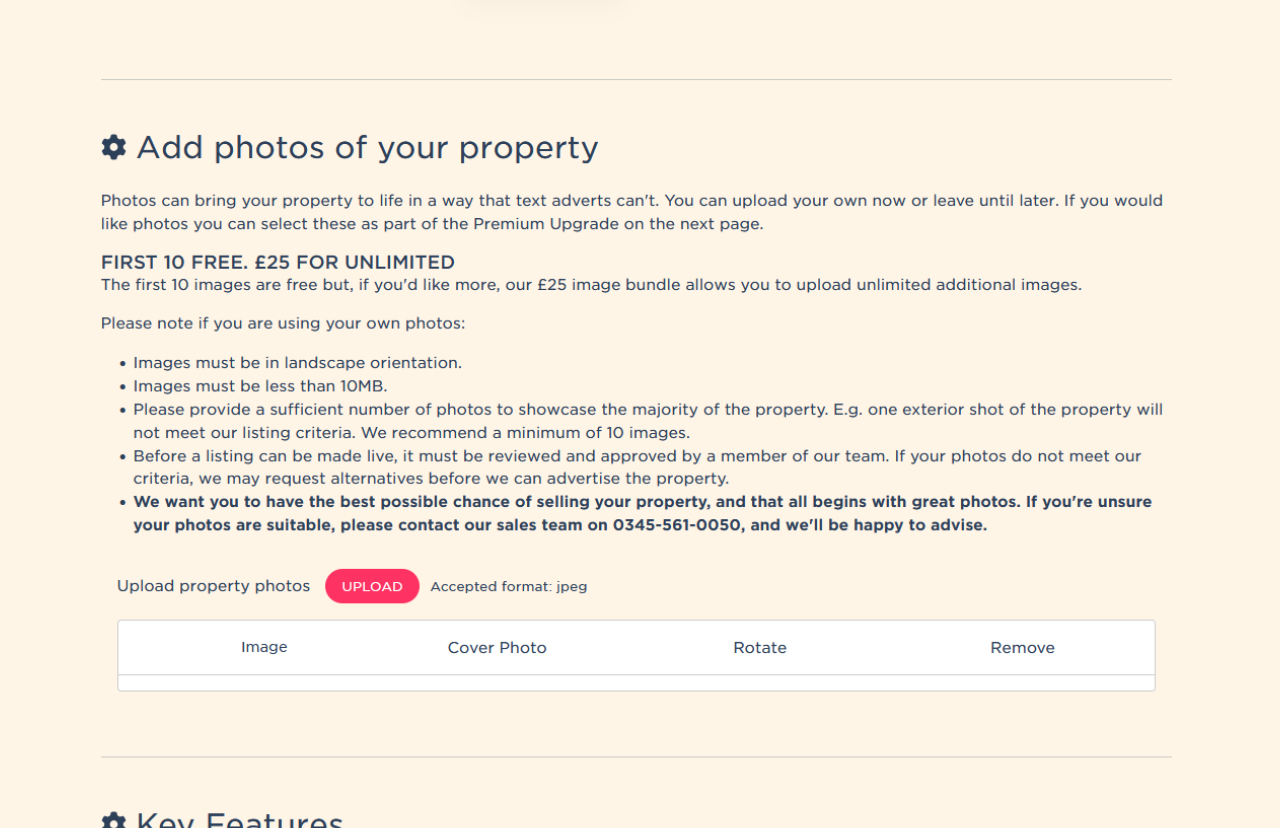
How Do I Upload Photos to My Listing?
1. In the Add photos of your property section, click the pink Upload button.
2. Your computer’s file browser will open.
3. Navigate to the folder with your property photos and select the images you want to upload (you can select multiple at once).
4. Click Open.
5. Your photos will begin uploading — you’ll see an on-screen message such as “Uploading image 1 of X… Please wait”.
6. Do not refresh the page during the upload process.
What Can I Do After My Photos Are Uploaded?
Once the photos appear in the list, you can customise them:
Reorder photos
Use the arrow icon next to each photo to drag it up or down the list. This controls the order
that buyers will see your photos.
Choose your cover photo
Click the Cover Photo radio button on the image you want as your main listing picture.
Rotate a photo
Click the rotate icon to turn the image so it appears correctly.
Remove a photo
Click the bin icon to delete any photo you no longer want on your listing.
How Do I Save My Changes?
Once you're happy with your photos:
1. Scroll to the bottom of the page.
2. Click Save & Continue.
3. Continue through the remaining steps of your listing until the process is complete.
Your changes will be saved and your photos will update on your Emoov listing once approved by the team.
We want you to have the best possible chance of selling your property, and that all begins with great photos. If you're unsure your photos are suitable, please contact our sales team on 03455610050, and we'll be happy to advise.
In Summary:
High-quality photos help your property stand out, and Emoov gives you all the tools you need to upload and manage them with ease. Take your time choosing the best images, follow the steps in this guide, and you’ll be ready to showcase your home confidently to potential buyers.
Useful Links
Sell Your Property
Selling FAQs
How to de-clutter and organise your home
How To Maximise Your Property's Exteriors For A Quicker Sale
Free Online Valuation
Contact Emoov Support
.png)
How to Price Your House Correctly: A Guide for UK Home Sellers
24.03.2026Learn how to price your house correctly using local sales data, online valuation tools and expert tips. A practical guide for UK home sellers.
.png)
The Ultimate Guide to Selling Your Home in the UK
10.03.2026Thinking of selling your home? This complete UK guide explains property valuations, pricing, marketing and tips to help you sell your house faster.
2.png)
How to Sell Your House Without an Estate Agent: A UK Guide
10.03.2026Thinking of selling your home privately? Learn how to sell your house without an estate agent in the UK and save thousands in fees.

Selling This Spring? Here’s How to Get Ahead of the Competition
26.02.2026Spring is one of the busiest times to sell, but more listings mean more competition. Here’s how to price, photograph and position your home to stand out and secure early offers.
.png)
Sell or Let Your Property Yourself – Why More UK Homeowners Are Choosing to Go Online
03.02.2026Selling or letting a property no longer has to mean handing over thousands of pounds to a traditional estate agent.
.png)
Before You List: Watch Emoov’s Top Tips for Home Sellers
20.01.2026Thinking about selling your home? Before you list, it’s worth taking a few minutes to watch this short video from emoov, where we break down the key steps every seller should take before going live online.










The legal stuff
Emoov is a trading name of Griffin Residential Limited. Griffin Residential Limited is a company registered in England and Wales. Company Reg No. 09362284.