

Floor plans help your property attract more interest online by giving buyers a clear view of the home’s layout, room sizes and flow - helping them visualise living there and reducing unnecessary viewings. You don’t need expensive software, as free tools make it easy to design professional floor plans that boost engagement and help your listing stand out on major property portals.
What Is a Floor Plan and Why Does It Matter?
A floor plan is a scaled drawing showing the layout of your property from above. It includes rooms, walls, major features and often dimensions. While not mandatory, floor plans are expected by many buyers and help your listing look professional and complete.
Why buyers care:
- Helps visualise how the space works
- Shows room sizes and layout clearly
- Reduces guesswork before viewings
- Makes your listing easier to compare with others online
See also Your Listing Photography: How to Make Your Home Stand Out Online - great photos combined with a strong floor plan give buyers a complete picture of your home.
How Do Floor Plans Help Sell Homes Faster?
Key benefits include:
- Encouraging emotional connection - floor plans help buyers picture themselves living in your home
- Answering common questions early - such as flow, room size and usability
- Filtering serious enquiries - buyers are more likely to enquire when they know the space suits their needs
What Should a Good Floor Plan Include?
A strong floor plan should:
- Show all rooms and the overall layout clearly
- Include room dimensions so buyers can assess scale at a glance
- Label rooms accurately (for example, “Living Room” or “Kitchen”)
- Optionally show windows and doors for added clarity
- Separate each level and combine them into one easy-to-view PDF
How Can I Create a Floor Plan Using Free Tools?
You don’t need expensive software to design professional-looking floor plans. Several free tools make the process simple and accessible:
- Planner 5D - an easy drag-and-drop tool for creating 2D and 3D layouts
- Floorplanner - popular for its simplicity and quick learning curve
- Roomstyler 3D Home Planner - useful for visualising layouts and interiors
- Sweet Home 3D - a downloadable tool for more detailed and customisable plans
How Do I Upload My Floor Plan to Emoov?
Save or export your floor plan as a PDF or JPG.
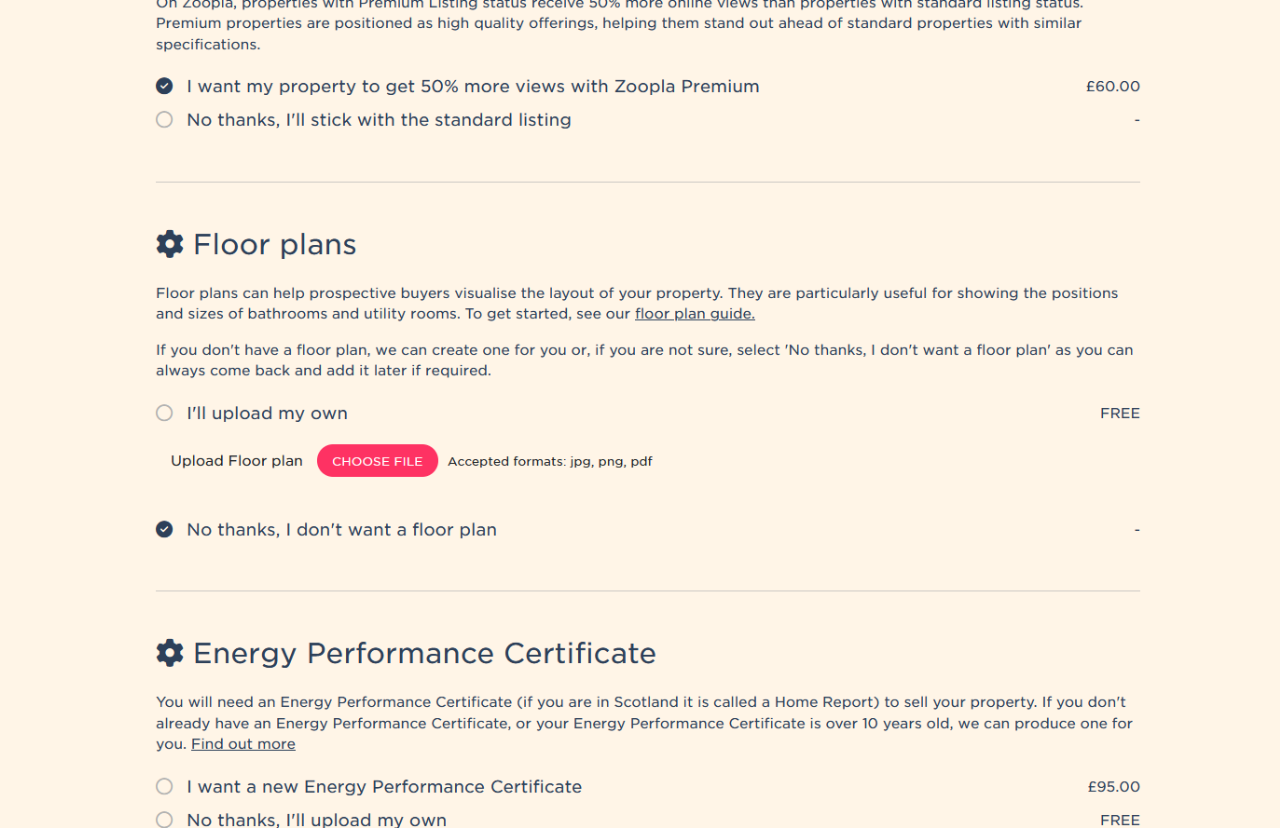
When you add a property or edit one you have already listed, you will see a Floor Plan section on the Add-ons page. Select ‘I’ll upload my own’, then click the Choose file button to upload your floor plan.
Final Tip
Before designing your floor plan, make sure your home is properly prepared for sale so every element of your listing works together to attract serious buyers. When combined with great photos and strong online marketing, a clear floor plan can help you achieve a faster and more confident sale.
Frequently Asked Questions About Floor Plans
Do floor plans help sell houses faster?
Yes. Floor plans give buyers a clear understanding of the property’s layout, helping them visualise how they would live in the space. This often leads to more enquiries and stronger interest.
How do I make a floor plan for free?
You can use free tools such as Planner 5D, Floorplanner, Roomstyler 3D Home Planner or Sweet Home 3D to create professional floor plans without design experience.
What is the best free floor plan software for property listings?
Floorplanner is ideal for quick layouts, Planner 5D is great for 2D and 3D visuals, and Sweet Home 3D offers more detailed customisation.
Should I include dimensions on a floor plan when selling my property?
Yes. Including room dimensions helps buyers quickly assess whether the space meets their needs and reduces unnecessary follow-up questions.
How do I upload a floor plan to my property listing?
Create separate plans for each level, combine them into a single PDF, and upload the file in the floor plan section of your listing. This ensures property portals clearly display that your home includes a floor plan.
Summary
Adding a clear floor plan to your property listing helps buyers understand the layout, room sizes and flow before they book a viewing. Listings with floor plans often attract more confident enquiries, reduce wasted viewings and stand out on major property portals.
You do not need expensive software to get started. Free tools make it easy to create professional-looking floor plans, which can then be uploaded directly to your Emoov listing alongside your photos and description.
For best results, combine your floor plan with: high-quality property photos, a clear property description, and, where possible, video content to give buyers a complete picture of your home.