Your Dashboard: Your messages

Your Emoov dashboard is the central place where all communication with potential buyers takes place. Whether someone wants more information, wishes to book a viewing or wants to make an offer, every message arrives straight in your dashboard - giving you full visibility and control throughout the selling process.
You’ll be notified by email whenever a new message arrives, so you never miss an opportunity to respond quickly and professionally. Prompt replies often lead to more viewings and stronger offers, so it’s worth checking your messages regularly.
Messages work alongside other dashboard tools such as Viewings and Offers, keeping everything connected in one place.
How Does Messaging Work in Your Emoov Dashboard?
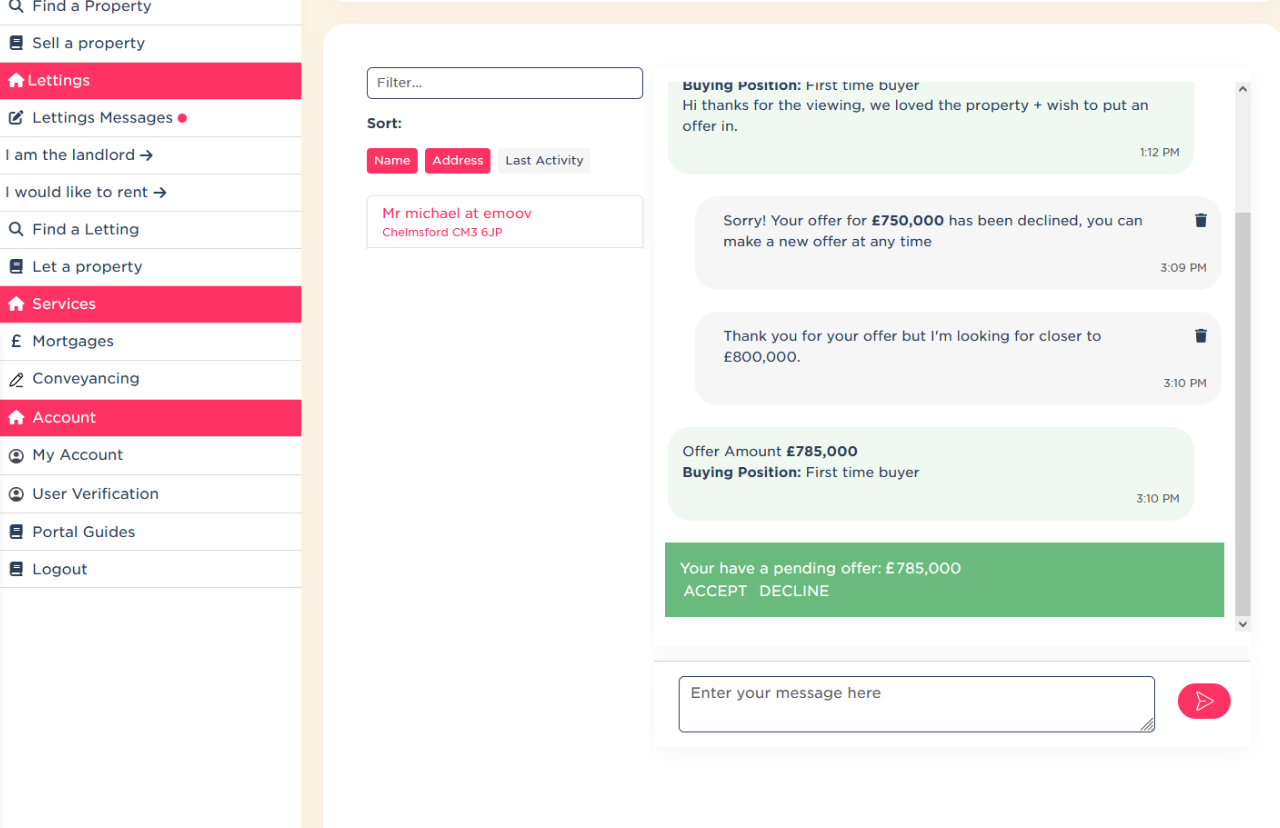
All communication with each buyer is kept together in one continuous message thread. This means general enquiries, viewing requests and offers all appear in the same conversation between you and that buyer.
Keeping everything in one place makes it easy to:
- Follow the full conversation from first enquiry to offer
- Respond without losing context
- Avoid switching between different screens or inboxes
- Stay organised and in control at every stage of the sale
This single-thread approach helps ensure nothing is missed and allows you to manage conversations professionally and efficiently.
What Types of Messages Will You Receive?
There are three main types of messages you’ll see in your dashboard.
General Enquiries
These are questions from buyers who are interested in your property but want more information before booking a viewing. They might ask about room sizes, parking, council tax, local amenities or anything else not fully covered in your listing.
Responding quickly and clearly to enquiries helps build trust and often leads directly to viewing requests. If you notice the same question coming up repeatedly, it may be worth updating your listing description to include that information.
Viewing requests
When a buyer wants to arrange a viewing, the request will appear in your messages thread. You can reply to confirm a suitable date and time, keeping all communication clear and documented in one place.
Handling viewing requests efficiently shows buyers that you are organised and serious about selling, which can increase confidence and improve the chances of an offer later on.
Offers
When a buyer makes an offer, it will also arrive in the same message thread. You will be able to see the offer amount and any conditions the buyer has included.
From here, you can accept the offer, decline it, or negotiate by continuing the conversation within the same thread. Keeping offer discussions in one place helps avoid confusion and ensures a clear record of what has been agreed.
Why Do Prompt Responses Matter?
Buyers often contact multiple sellers at once. If responses are slow, interest can fade quickly. Emoov’s messaging system helps by alerting you as soon as a new message arrives, so you can reply while the buyer is still engaged.
How Can You Use Your Messages Like a Pro?
- Check your messages regularly, even if you have notifications enabled
- Be clear, friendly and professional in your replies
- Keep all communication within the dashboard to maintain a full record
- Update your listing if you receive repeated questions about the same details
Summary
Your Messages section is designed to keep everything simple, organised and transparent. By keeping all buyer communication in one continuous thread, Emoov makes it easier to manage enquiries, arrange viewings and negotiate offers without unnecessary complexity.
Staying responsive and organised in your dashboard helps you stay in control of the sales process and move confidently from first contact through to completion.
Useful Links
.png)
A Step-by-Step Video Guide: Uploading a Property
23.12.2025This guide explains how to upload your property listing on Emoov, with a step-by-step video and expert tips on photography, presentation, floorplans, descriptions and video tours to help you get your home live quickly.
.png)
Welcome to Your All-New Emoov Dashboard!
03.07.2025We’ve been busy behind the scenes designing a brand-new dashboard to make navigating Emoov smoother, faster, and more enjoyable. With a cleaner layout and powerful new features, managing your property journey has never been easier.

Your Dashboard: Rightmove Subscription
16.02.2024Rightmove is one of the UK’s most popular property portals, and upgrading your Emoov listing with a Rightmove subscription can help your property reach more potential buyers.

Your Dashboard: Offers
16.02.2024Receiving an offer is one of the most important moments in your sale. Your Emoov dashboard gives you full control, letting you review, negotiate and respond to offers clearly and confidently, without pressure.

Your Dashboard: Viewings
16.02.2024
Your Dashboard: Properties I’m Interested In
16.02.2024When you’re searching for a new home, keeping track of the properties you’ve shown interest in is essential. Your dashboard makes this easy by gathering everything into one organised space.










The legal stuff
Emoov is a trading name of Griffin Residential Limited. Griffin Residential Limited is a company registered in England and Wales. Company Reg No. 09362284.